


loader

Check in safely with Rangerly

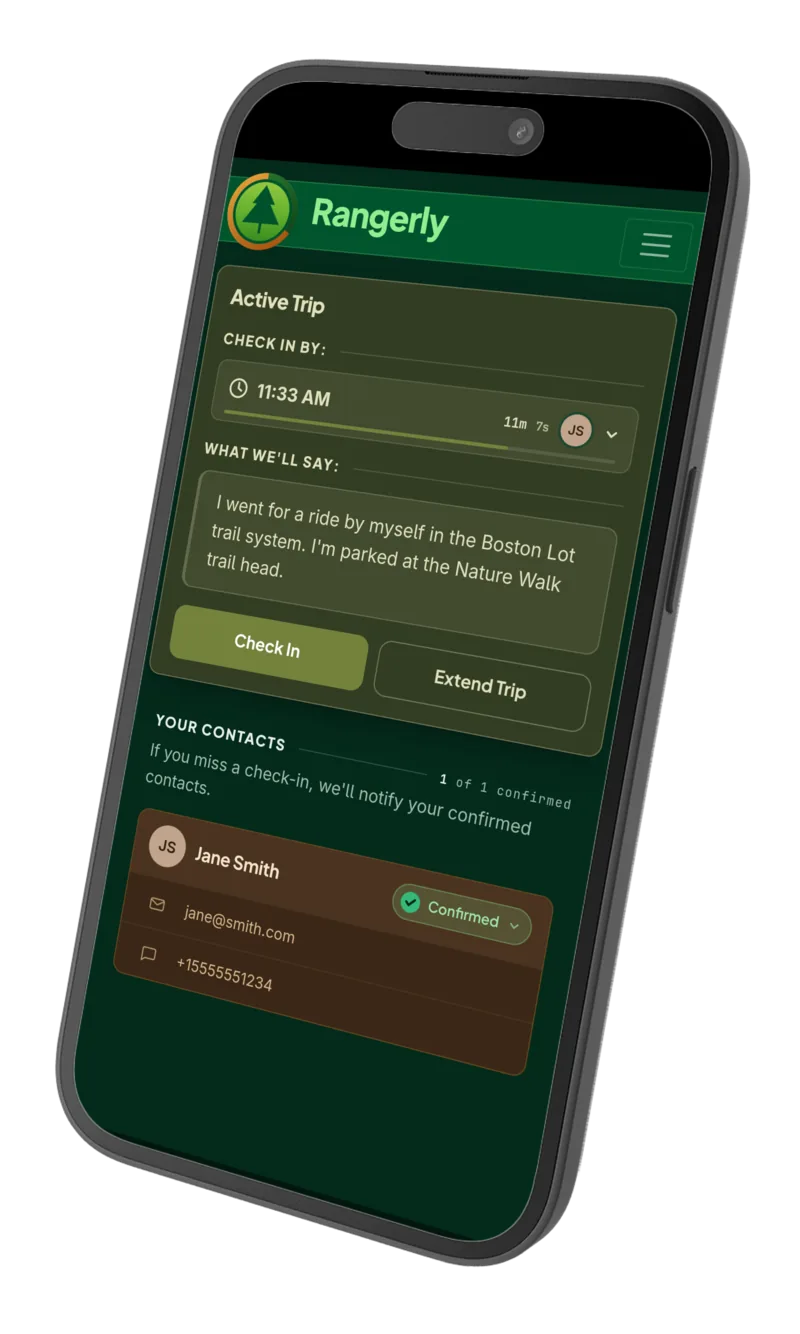
Tell us about your trip and when you expect to return. We'll alert your emergency contacts if you don't check back in.

The goal is simple: to give you the freedom to adventure while creating a safety net in case something goes wrong.

Start a 30-Day Free Trial
No credit card required.
How It Works

Helmet. Water. Rangerly.

A simple routine, designed for everyday adventures or epic expeditions.

Photograph of sunset over a lake

Step 1. Create a Trip

Tell us what you're planning to do, where you're headed, and when you expect to be back.

Photograph of mountain sunrise

Step 2. Ignore Us

Your trip runs on our servers and your phone doesn't even need to be on. You focus on the adventure.

Photograph of snowy lake

Step 3. Check In

When you're back, check in on the app or send us a text. Running long? Tap or text to extend your trip.

And if you don't check in?

Fifteen minutes before your deadline, we'll remind you. Miss it anyway and we send your trip details to your emergency contacts by email and text.

Start a 30-Day Free Trial
Your Emergency Contacts

A Small Ask, A Big Impact

No app, no password, nothing for your emergency contacts to install. Ideally, saying 'yes' is the only thing they ever have to do. But on the day it isn't — you'll be glad you asked, and they'll be glad they answered.

  1. Name, Email, Invite

    Enter your emergency contact's name and email. They'll get an invitation to confirm it, with the option to add a mobile number if they'd like to receive text alerts.

  2. Then... Nothing

    You ride Tuesday night. They hear nothing. You kayak Saturday morning. Still nothing.

  3. And... More Nothing

    Months of runs, rides, hikes, and paddles that they never hear about. That's the design, not an oversight. Your activities stay private.

  4. Until It's Not Nothing

    Miss a check-in and your note goes out within five minutes, by email and text (if they added a number). It's sent from our servers, so it reaches them whether or not you still have signal. And it tells them exactly what to do: try reaching you, check with anyone you might be with, trust their gut, and call authorities if they think you're in danger.

Start a 30-Day Free Trial
No credit card required.
A Rangerly missed check-in alert on a phone
Features

Simple, Private, and Untethered.

Text Mode

One Bar of Service Is Plenty

Start a trip, extend for another hour, and check in when you're back, all by text. No app, no browser, no mobile data required.

  • GOStarts the trip and sets your check-in deadline.
  • EXTENDPushes your check-in deadline back an hour.
  • SAFEChecks in and closes out the trip.

Send them to +1 (603) 435-2220, the number Rangerly texts you from.

Ride It Again

Every trip is saved. Find last Tuesday's ride, tap Repeat, and this Tuesday's is set up with the same note and duration. The routes you do most take the least effort to set up.

Nothing to Track

You tell us where you're going. We don't track you getting there. The note you wrote is seen only by the contacts you chose, and only if you miss the check-in.

Nothing to Install

Any browser, any device. Nothing to install means nothing running on your phone in the background, nothing to update, and nothing draining your battery at the trailhead.

Try it on your next trip.

No credit card required, and nothing to cancel.

Start a 30-Day Free Trial
FAQs

Frequently Asked Questions

Getting Started

Click the "Start a 30-Day Free Trial" button and enter your name, email address, and password—no credit card required. We'll send you a confirmation email with a link to verify your address. Once you click that link, you're all set to add emergency contacts and create your first trip.

Adding your mobile number is optional—you can run trips entirely from the web app without one. Add it and you get Text Mode as well. Save our number—+1 (603) 435-2220—to your contacts, or just wait: we'll text you from it when you create your first trip in the web app.

When you log in for the first time, Rangerly will prompt you to add an emergency contact. Just enter their name and email address, and we'll send them an invitation to get set up.

We recommend giving your emergency contacts a heads up directly after you invite them. Let them know to expect an email from Rangerly so they recognize it as legitimate. It's also a great opportunity to discuss what you'd like them to do if they ever receive an alert—whether that's trying to call you first, checking certain locations, or any other preferences specific to your situation.

They'll receive an email invitation with a link to complete their setup. They'll confirm that email address is where they want to receive alerts and can optionally add their phone number if they'd like text alerts too.

After at least one of your emergency contacts has finished their setup, you'll see a prompt to create a trip when you log in. You'll enter details like where you're going, what you're doing, and when you expect to return—then you're ready to head out.

Once you're set up, you can also start a trip by text: send GO, how long you'll be gone, and whatever you want your contacts to know—for example, GO 2h Riding Ridgeline loop, silver truck at the Moose Mtn trailhead.

Absolutely. Before inviting your actual emergency contacts, add yourself as a contact first. This way you can create test trips, intentionally miss check-ins, and experience the entire process without causing any unnecessary worry. It's a great way to get comfortable with how everything works.

Using The Service

No. If you can send a text, you can run a trip. Text GO 2h Riding Ridgeline loop to start one, EXTEND to add an hour, and SAFE to check in. The web app is there when you have a connection, but you don't need it to use the service.

And if you lose service entirely after starting a trip, Rangerly still alerts your contacts if you miss your check-in. The clock runs on our servers, not on your phone.

About 15 minutes before your deadline, we'll send you a reminder—by email, and by text as well if you've added your mobile number. Check in and that's the end of it. It's a courtesy, though, not a guarantee: if you're somewhere without signal it won't reach you, so don't rely on it to keep track of your deadline for you.

If you don't check in, your emergency contacts will receive a notification (via email or text, based on their preferences) with the trip details you provided. The message reminds them not to panic and suggests steps to confirm you're safe—like trying to reach you directly. If they can't reach you and believe something is wrong, we advise them to contact emergency services.

Yes! An extension buys you another hour—text EXTEND to Rangerly, or tap the "Extend" button on your active trip in the app.

Either way, you can do it as many times as you like—we know adventures don't always go according to plan. And extending is silent: your emergency contacts hear from us only if a check-in is actually missed.

Check in as soon as you can. Text SAFE to Rangerly, or log in and check in from the app—either one sends an automated follow-up letting your contacts know you're safe.

We strongly recommend calling them directly as well. They may have already taken action, like calling local authorities or heading out to find you, and a personal call will help stop those wheels in motion.

Privacy & Notifications

No. Privacy is one of Rangerly's core features—your contacts are only notified if you miss a check-in, not every time you head out.

Absolutely. Rangerly doesn't track your location at all. When you create a trip, you decide what details to share (like a general area or activity type). Your emergency contacts only see this information if you miss a check-in—and only what you chose to provide. We never share your exact location because we don't have it.

Only the information you provided when creating your trip. This typically includes your expected return time and any details you chose to share—like a general location, activity type, or special notes (vehicle description, trail name, etc.). Your emergency contacts won't receive anything you didn't explicitly provide upfront.

Yes. Rangerly keeps a complete history of all your trips, including when you left and when you checked in. You can review past trips and use them as templates to quickly create new ones—perfect if you regularly ride the same trails or visit the same locations.

Safety & Emergency Response

No. Rangerly notifies your emergency contacts, but it's up to them to decide whether to contact emergency services. The alert reminds them to try reaching you first and when to escalate to authorities, but the decision remains with your trusted contacts who know you and the situation best.

The alert walks your contacts through a clear set of steps: try reaching you directly first (call, text, or message), contact anyone you mentioned being with, check your usual locations if something feels off, and contact authorities if they believe you're in danger. The message emphasizes that most missed check-ins aren't emergencies, but encourages your contacts to trust their instincts.

Ask yourself: "If I needed help, what would someone need to know to find me?" This might include where you're going, what you're doing, vehicle details, who you're with, and any other relevant context like the trail name or backup plans. You decide what to share, but more information helps your contacts make informed decisions.

Your emergency contacts are notified within 5 minutes of a missed check-in. Once you check in to Rangerly, you'll see whether your contacts have been alerted. Either way, we strongly recommend reaching out to them directly—a quick call can prevent unnecessary worry or action on their part.

Pricing & Account

Sign up and start using Rangerly immediately—no credit card needed. You'll have full access for 30 days to test all the features. After that, your trial simply expires unless you decide to subscribe. We won't charge you anything or ask you to cancel.

No. You can sign up and start using Rangerly immediately without entering any payment information. During your trial, you'll see a countdown showing how many days you have left, with the option to add payment details whenever you're ready. Either way, you get your full 30 days.

If you've subscribed during your trial, nothing changes—you keep using Rangerly at $5/month. If you haven't added payment information, your account simply closes. You won't be able to create new trips, but you can reactivate anytime by logging back in and subscribing.

$5 per month. That's it—no hidden fees, no per-trip charges, and no limits on check-ins.

Technical

Rangerly is a web-based application, so it works on any device with a modern web browser—iPhone, Android, Mac, PC, tablets, you name it. No app download required. That's where you'll manage emergency contacts, review trip history, and create trips.

When a browser isn't practical, Text Mode covers the things you actually do on the trail: text GO to start a trip, EXTEND to buy another hour, and SAFE to check in. Any phone that can send a text will do—no data connection required.

No. Rangerly doesn't track your location. We only know what you tell us when you create a trip. Your privacy is a core feature, not an afterthought.

No. Because Rangerly doesn't track your location or run continuously in the background, it won't drain your battery. You only interact with it when setting up trips or checking in, so the battery impact is negligible.

Since your trip runs on Rangerly's servers, and not your phone, your emergency contacts will still be notified if you miss your check-in—even with a dead phone.

To check in or extend, though, you'll need to reach us somehow. Text Mode recognizes you by the number on your account, so texting from a borrowed phone won't work—but logging in will, from any device with an internet connection. A friend's phone, a laptop, or a computer at the trailhead lodge all do the job.

Pricing

Pocket change
compared to your kit.

Priceless for peace of mind.

Rangerly Pro

$5/month

Everything you need to adventure safely:

  • Unlimited trips and check-ins
  • Automatic missed check-in alerts
  • Alerts via email and SMS
  • Full trip control by SMS
  • Extend trips anytime
  • Complete check-in history